July 19, 2011
Follow these easy steps to get both Khmer Unicode and Limon font
support on your Apple Mac computer with a switchable keyboard preference
for both options.
- Download the Khmer font archive with KhmerOS Unicode, NIDA Unicode
and Limon fonts. Unzip the file and place the contents in the folder:
Macintosh HD/Users/yourusername/Library/Fonts - Download the Khmer keyboard layout and unzip the file. Place the contents in the folder: Macintosh HD/Library/Keyboard Layouts
- Navigate to the System Preferences in your Applications folder by pressing Shift+Command+A or click on the Apple logo in the top left of your Finder and select System Preferences. Now open the Language & Text preference pane, select Input Sources and tab the Khmer and Limon boxes. Also make sure the Select Input menu in menu bar is checked.
 Language & Text - Next go to the Keyboard Preferences pane in the System Preferences in the second row listed under Hardware. Select Keyboard Shortcuts and the Keyboard & Text Input listing on the left. Tab Select next source in Input menu.
 Keyboard Shortcuts
- After you tab you will see a warning that the shortcut is used by another action. Select the Spotlight listing and either uncheck Show Spotlight window or give it a new, unused shortcut.
(Thank to Mac Cambodia!)
Posted by imenu. Posted In : MAC
July 8, 2011
Check the Android Market and you will find an update the Maps. The new version
is 5.7.0, once updated you will see a splash screen

To enable offline maps, go to “More” from the menu.

Select the “Labs” option

Tap on the “Download map area” section to enable it. You will see the green
tick mark to indicate that it is enabled.

Next, go to the city or are you are interested in. Tap on any place, you will
get the popup place label. Click on the right arrow (>)

You will get the... Continue reading...
Posted by imenu. Posted In : Android
July 8, 2011
If you are curious to have iOS 4 features like Multitasking, Folders or
tethering ? This tutorial will show you how you can enable or jailbreak
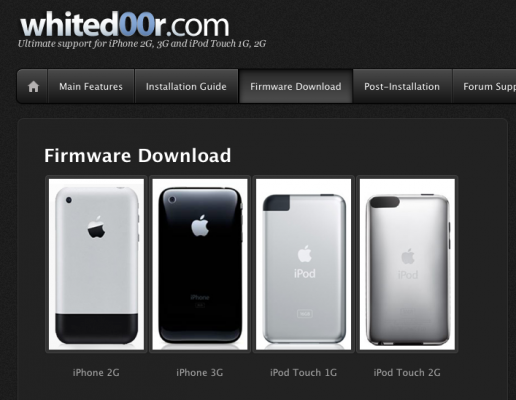
iOS4 features on iPhone 2G, iPhone 3G using whiteD00r.
Here are few steps below:
- Log on to to whited00r.com and roll your mouse to 'firmware download' page..
- You will need to extract the .zip file(make sure unzip utility note doesn't extract the contents of .ispw as well )
- Now
you will need to plug your iPod touch or iPhone 3G 1 or 2 into iTun...
Continue reading...
Posted by imenu. Posted In : iPhone/iPod
July 6, 2011
After weeks of waiting and talking wrong ETAs, Comex has finally
released JailbreakMe 3.0 to give your iPad 2
a simple and easy jailbreak. JailbreakMe 3.0 is the first untethered
jailbreak for iPad 2 since it was released. Some users are experiencing
some problems, issues, bugs with JailbreakMe 3.0 so we’ve made this post
to cover everything related to JailbreakMe 3.0.

What’s JailbreakMe & How Does It Work?
In case you’re new to the jailbreak world, you must know these
things... Continue reading...
Posted by imenu. Posted In : iPad
July 6, 2011
Below are the instructions on how to jailbreak iPad 2, iPad 1, iPhone 4, iPhone 3GS, iPod touch 4G, and iPod touch 3G running on iOS 4.3.3 with JailbreakMe 3.0.
Step One
Open MobileSafari on your iPad 2 that supports the above mentioned
firmware. If you are not on iOS 4.3.3 please make sure you update your
device to iOS 4.3.3 before attempting this jailbreak.
Step Two
From your MobileSafari, navigate to http://www.jailbreakme.com and tap the Free button.

Step Three
Now tap on the Insta... Continue reading...
Posted by imenu. Posted In : iPad
July 4, 2011
That looks crazy but it’s real. An iPhone 4 prototype is now
available on eBay and it’s the same as Gizmodo’s prototype last year. In
case you are really in love with Apple products, you might want to know
how was its prototype.

The news comes from ThisIsMyNext where they found this iPhone 4
prototype without any warranty, can’t be activated via iTuens and even
without “+” and “-” markers on the volume buttons. It’s just a black
iPhone 4 with “DF1692″ mark in th... Continue reading...
Posted by imenu. Posted In : iPhone/iPod
July 3, 2011
Well, it looks like that Comex is giving up for his jailbreak, as while I
was checking domains at Godaddy.com I found that JailbreakMe.com is
available but guess for how much the domain cost ? $2,400 yes that's
right Comex offers his jailbreak domain, and from what happened it maybe
a message from Comex that he will not release JailbreakMe 3.0 for iPad 2
Jailbreak...
Currently there are no other news on, hoping that
Comex will shed light on the matter. Continue reading...
Posted by imenu. Posted In : iPad
July 3, 2011
Posted by imenu. Posted In : iPhone/iPod
July 3, 2011
Yesterday’s hottest news was the leaking of a beta version of
JailbreakMe that set the jailbreaking community on fire.
Goncalo wrote a step-by-step guide for interested iPad 2 owners on how
to go about jailbreaking the iPad 2 with it and, today, we’ve
learned about how the leaking took place.

The story comes from Ryan Lobbins who states that, after Comex tweeted
about a site called qoid.us, he stumbled upon the JailbreakMe
files in a directory on the site’s servers. This was ... Continue reading...
Posted by imenu. Posted In : iPad
July 2, 2011
The Loop contains a very touching story that has had as one of its protagonists the iPhone. Thanks to the iPhone by, in fact, it was possible for a mother and her daughter meet again after five long years.

The story of The Loop, and reported by various international magazines, takes place in China and starring an elderly lady who for the past five years has not heard from her daughter.
She sees and stops at first a passerby who used an iPad asking him to take a picture and post it online so... Continue reading...
Posted by imenu. Posted In : iPhone/iPod
|
About Me
solving IPhone, IPod, IPad and other gadget problems... ដំណោះស្រាយសំរាប់ IPhone, IPod, IPad និង៝ឧបករណ៏អេឡិចត្រូនិច ផ្សេងៗទៀត
we will provide the best solution for you...
|